Differentiate VMs and physical resources
Understand what information you need to gather for low density and high density.
FREE WHITEPAPER · BBI SOFTWARE AG
Which hosts and virtual machines are included in your SUSE subscription balance? The guide explains low density, high density, cluster boundaries and the special testing of SAP environments.
6 pages · Email confirmation required · No automatic newsletter subscription
FOR YOUR NEXT STEPS
For those responsible for IT, purchasing and software licenses.
Understand what information you need to gather for low density and high density.
Include migration, maintenance, and failover in the scope of your environment.
Check SUSE edition, SAP workloads and the appropriate subscription before comparing costs.
A FIRST INSIGHT
In the fictional cluster example, twelve standard SLES VMs typically run on two hosts. In the event of maintenance or failure, you can switch to two additional hosts. Each host has two occupied sockets. Under the assumptions mentioned in the guidance, the shared high-density environment counts with four subscriptions.
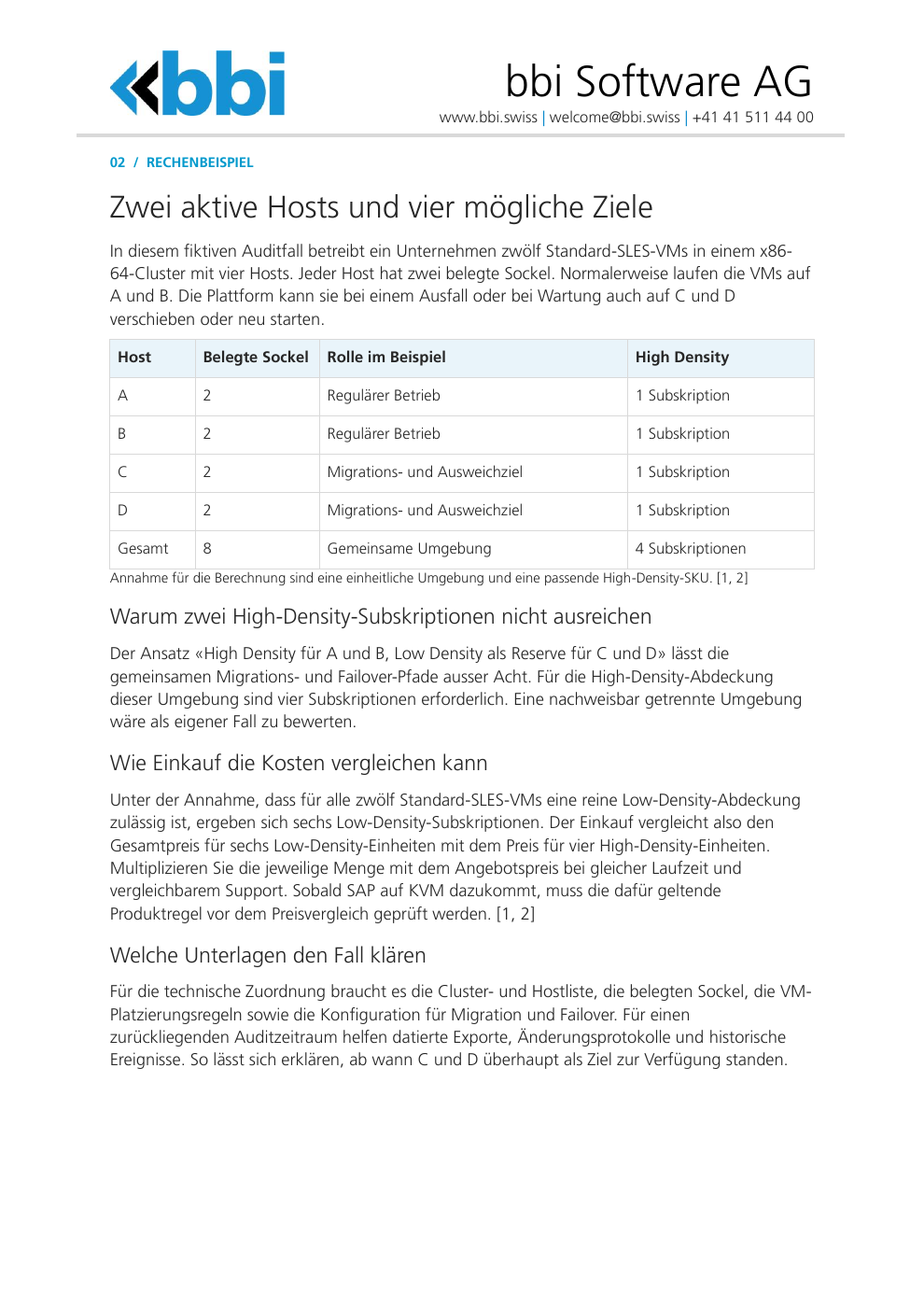
The preview contains a selected content page. You will receive the complete PDF with 6 pages after free registration.
QUESTIONS FROM PRACTICE
The twelve VMs can also be moved to or restarted on the other two hosts in the event of maintenance or failure. The white paper therefore considers all four as a common environment. For the assumed high-density SKU with two occupied sockets per host, this results in four subscriptions.
In the fictional example, six low-density units for twelve standard SLES VMs are compared to four high-density units for the host environment. The low-density variant assumes that this coverage is permissible in the specific case. Only then compare offer prices with the same term and comparable support.
Document hosts, occupied sockets, VM placement rules, and migration and failover. Also check maintenance, manual interventions and alternate locations. For past periods, dated exports and change logs help to show which hosts were available as targets and when.
The installed SUSE edition and the SAP workload influence the product allocation and the rules to be applied. Therefore, record edition, hypervisor, workload, and ordered SKU separately before applying a standard SLES calculation. Additionally, check the coverage of HA nodes and recovery environments using the documentation applicable to your time period.
6 PAGES FOR YOUR PRACTICE
Get the documentation for your next steps.
6 pages · Email confirmation required · No automatic newsletter subscription
FROM READING TO APPLYING
Evaluate RVTools or Excel files for free: Overview hosts, VMs and known physical cores, identify data gaps and use results as PDF.
Get to know the tool →UP TO 26 POSITIONS FREEManage software licenses and contracts centrally. Up to 26 license positions free of charge, with company areas, account storage and Excel export.
Get to know the tool →FREE TOOLPrepare software audits for free: 18 current bbi tasks, edit your own tasks, appointments and notes and document the status as a PDF.
Get to know the tool →Stay with VMware, adapt the environment or switch gradually? The guide helps you consider the license model, package scope, infrastructure and operating costs together.
Get to know the white paper →The checklist for IT, purchasing and license managers. First, clarify the scope and deadlines. Then organize data collection and comparison with your license rights.
Get to know the white paper →